Transform Your Broadcast with a Professional Live Streaming Overlay Panel
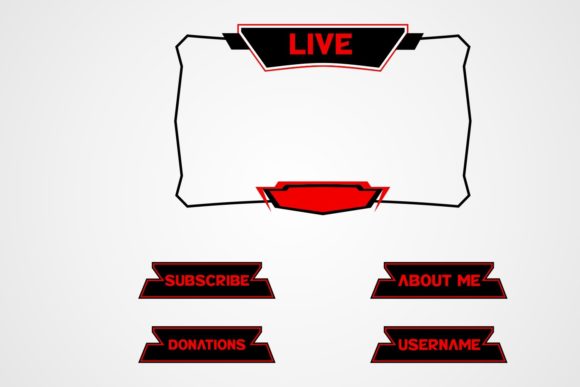
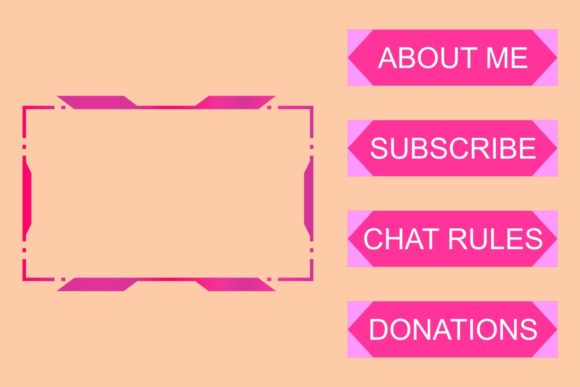
Imagine you are moments away from hitting the "Go Live" button. Your lighting is set, your audio levels are checked, and your topic is ready. But when you look at the preview screen, something feels off. The stream looks bare, almost amateurish, lacking the visual cues that tell viewers exactly what is happening. This is where a Live Streaming Overlay Panel becomes the difference between a hobbyist broadcast and a professional production. These graphic elements act as the digital signage of your channel, guiding your audience through the experience without you having to say a word.
At its core, an overlay panel is a collection of graphical assets designed to sit on top of your video feed. However, not all overlays are created equal. The true value lies in accessing files that are openable, editable, and resizable without losing quality. When you download a package that includes vector files, you aren't just getting a static image; you are getting a flexible toolkit. Whether you are using Adobe Illustrator, Corel Draw, or other vector-based graphics programs, having access to the source files means you can tweak colors to match your brand, change text to fit your specific event, or resize elements to fit any screen resolution perfectly.
Why Vector Quality Matters for Streamers
In the world of digital design, resolution is everything. If you rely solely on standard raster images like JPGs or PNGs, you are limited by their pixel count. Stretch a small PNG too far to fit a wide monitor, and it becomes blurry and pixelated, instantly degrading the perceived quality of your stream. This is why receiving Vector AI, Vector SVG, and Vector CMX files alongside standard image formats is a game-changer.
Vectors use mathematical paths rather than fixed pixels. This means you can scale a lower-third banner from a mobile phone screen size to a massive 4K television display, and the lines will remain crisp and sharp. For creators who plan to grow, this future-proofs their branding. You might start streaming on a basic setup, but if you upgrade your camera or switch platforms later, your graphics won't need a redesign. They simply resize to fit the new standard. Having the editable source files allows you to adapt quickly. Maybe your brand color shifts from blue to teal next year; with vector files, that is a two-click change rather than a request to a designer or a search for a new download.
Real-World Applications Across Different Niches
The utility of a well-designed overlay panel extends far beyond just gaming. While gamers were the early adopters, today's live streaming landscape is diverse, and these tools serve a wide array of professionals and hobbyists.
For Educators and Tutors: Consider an online teacher hosting a live math workshop. A clean overlay panel can provide a dedicated space for the lesson title, the instructor's name, and a "Ask Questions Below" prompt. Using editable vectors, the teacher can update the topic for every single class without starting from scratch. It keeps the student focused on the whiteboard while ensuring they always know who is teaching and what the current module is.
For Small Business Owners and Entrepreneurs: Think about a local bakery doing a live launch of a new pastry line. An overlay can feature a "Live Now" indicator, a scrolling ticker with special discount codes, and a branded frame around the product showcase. Because the files are resizable, the owner can use the same graphics for a vertical Instagram Live session in the morning and a horizontal Facebook Live event in the evening, maintaining consistent branding across platforms.
For Podcasters and Interviewers: Remote interviews often suffer from visual monotony. A lower-third panel introduces guests with their name and social media handle. If the host uses vector files, they can easily swap out the guest's name in real-time or prepare a template batch before the show. This adds a layer of polish that signals to the audience that the content is valuable and worth their time.
For Fitness Coaches: A fitness instructor leading a live workout needs to keep energy high. An overlay panel can include a timer, a rep counter, or a motivational quote bar. The ability to edit these elements means the coach can tailor the intensity indicators to the specific workout of the day, making the stream interactive and easy to follow.
Making the Right Choice for Your Setup
Before you download or purchase a Live Streaming Overlay Panel, there are practical considerations to ensure it fits your workflow. First, assess your technical comfort level. If you have never opened Adobe Illustrator or Corel Draw, the inclusion of vector files might seem intimidating. However, many streamers find that learning the basics of these programs pays off immediately. Even simple edits, like changing a hex code for a color or typing a new name, empower you to own your brand identity completely.
Second, consider the versatility of the package. A good download should provide a comprehensive suite of formats. You want the Image JPG for quick previews, the Image PNG for transparent backgrounds in OBS or Streamlabs, and the vector formats for deep customization. If a package only offers flat images, you are locking yourself into a specific look forever. Flexibility is key in a fast-moving digital environment.
Also, think about your long-term branding strategy. Does the overlay style match the tone of your content? A neon-heavy, aggressive design might work for a competitive esports tournament but would feel out of place for a calm meditation guide or a corporate webinar. Look for designs that offer neutral structures which you can populate with your own personality through color and text edits.
Maximizing the Value of Your Download
Once you have secured your files, the real work begins in integration. Do not just drag and drop; take the time to organize your layers. In vector programs, separate the background shapes from the text elements. This makes it infinitely easier to toggle visibility during a live broadcast. For instance, you might want to show the "Starting Soon" screen initially, then fade it out to reveal the camera feed while keeping the lower-third name tag visible.
Furthermore, leverage the scalability. Test your graphics on different devices. Check how your overlay looks on a desktop monitor, a tablet, and a smartphone. Since vector files retain quality at any size, you can confidently adjust your composition knowing it won't break on smaller screens. This attention to detail ensures that no matter how your audience tunes in, the experience is seamless.
Ultimately, investing in a high-quality, editable overlay system is an investment in your credibility. It tells your viewers that you respect their time and have put effort into the presentation. Whether you are a freelancer showcasing a portfolio, a marketer launching a product, or a hobbyist sharing a passion, the right visual framework elevates the content. By choosing a package that includes Vector AI, Vector SVG, and Vector CMX files, you ensure that your stream grows with you, adapting to new trends and technologies without losing that sharp, professional edge.
Thanks for downloading and taking the step toward a more polished broadcast. With these tools in hand, you are not just streaming; you are producing a show that stands out in a crowded digital landscape.