Mastering Your Brand Image with a Professional Digital Marketing Facebook Cover Design
Your Facebook page is often the first interaction a potential client has with your brand, and the cover image is the billboard that stops them from scrolling past. A well-executed Digital Marketing Facebook Cover Design does more than just fill space; it communicates your value proposition, establishes trust, and guides visitors toward taking action. Whether you are a freelancer, a small business owner, or a seasoned marketer, understanding how to leverage this visual real estate is critical for online success. However, many professionals stumble not because they lack creativity, but because they overlook technical details and strategic alignment when selecting or customizing their banners.
The concept of a digital marketing cover design extends beyond simply placing a logo on a background. It is a strategic asset that must align with your profile picture, your current campaigns, and your overall brand identity. People are interested in high-quality templates because they offer a shortcut to professionalism without the steep cost of hiring a graphic designer for every minor update. A clean, eye-catchy professional social media cover template allows any kind of business to present a polished front immediately. Yet, the ease of access to these templates often leads to complacency. Users assume that downloading a file guarantees a great result, ignoring the necessary steps to make the design truly effective for their specific needs.
Common Pitfalls in Selecting and Customizing Templates
One of the most frequent mistakes marketers make is choosing a design based solely on aesthetics while ignoring functionality. You might find a template that looks stunning in the preview, featuring vibrant photography and complex layering. However, if the text is not fully editable or if the file format does not match your software capabilities, you will hit a wall. For instance, many users download files expecting to edit them in basic photo viewers, only to discover the template requires vector software like Adobe Illustrator. If a template offers an Illustrator (AI) or EPS file, it implies a need for vector editing tools. Failing to check this requirement beforehand wastes time and creates frustration.
Another significant oversight involves color modes and resolution. Digital screens operate on the RGB Color Mode, whereas print materials use CMYK. A common error occurs when users inadvertently convert files to CMYK or download assets designed for print, resulting in dull, washed-out colors on social media feeds. Furthermore, while high-resolution is generally good for print, social media platforms compress images heavily. A design created at 72 DPI Resolution is standard and optimal for web use. Uploading a 300 DPI file does not improve quality on Facebook; instead, it increases file size, potentially slowing down load times and triggering aggressive compression algorithms that degrade image clarity.
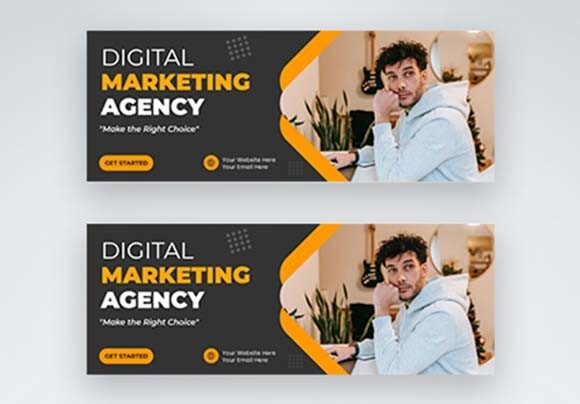
Typography is another area where mistakes frequently happen. A template might showcase a beautiful font like Montserrat, which is popular for its clean, modern geometric look. However, if the user does not have this font installed or fails to replace the placeholder text with a legible alternative, the design breaks. Some users stretch text boxes to fit longer headlines, distorting the font's aspect ratio. This makes the brand look amateurish. The text tool in your editing software should be used to reflow text or adjust sizing proportionally, never by dragging the corners of the text box haphazardly.
The Hidden Costs of Poor Visual Execution
When a Facebook cover design fails to load correctly or looks pixelated, it directly impacts user perception. In the digital marketing world, credibility is currency. A blurry banner suggests a lack of attention to detail, leading visitors to question the quality of your products or services. This affects communication efficiency; if your audience cannot read your headline or understand your offer within three seconds, they will scroll away. The cost here is not monetary but measured in lost engagement and reduced conversion rates.
Moreover, using images that are included in a preview but not in the download file can lead to legal and ethical issues if not handled correctly. Most professional templates note that all images are just used for preview purposes only and NOT included in the download files. Ignoring this warning and attempting to screenshot or extract these images for commercial use can lead to copyright infringement claims. Instead, this limitation should be viewed as an opportunity to inject authentic branding. Using stock photos that everyone else uses dilutes your unique voice. Replacing preview images with high-quality photos of your actual team, product, or workspace creates a genuine connection that generic assets cannot achieve.
Strategic Approaches for Better Results
To avoid these pitfalls, adopt a checklist approach before finalizing your design. First, verify the file formats. Ensure you have the appropriate software to handle AI or EPS files. If you do not have access to Adobe Illustrator, look for templates that also provide PSD (Photoshop) or Canva links, ensuring you can actually edit the layers. Second, confirm the color mode is set to RGB before exporting. This ensures the colors on your screen match what your audience sees on their devices.
When customizing the text, prioritize hierarchy. Your main headline should be bold and concise, utilizing fonts like Montserrat effectively without distortion. Use the subtext to elaborate slightly, but keep it readable on mobile devices. Remember that a significant portion of your traffic comes from smartphones, where the cover image is cropped differently than on desktops. Always preview your design on both interfaces to ensure critical information isn't hidden behind your profile picture or cut off at the edges.
Leverage the fact that these templates are 100% customizable. Do not treat them as static images. Change the color palette to match your current seasonal promotion or brand refresh. If your business pivots from selling products to offering consulting services, your cover should reflect that shift immediately. The ability to edit easily means your Facebook page can remain dynamic and relevant, rather than becoming a stagnant digital brochure.
Making the Right Choice for Your Business
Before downloading or purchasing a Digital Marketing Facebook Cover Design, evaluate the source and the included documentation. Look for clear descriptions regarding font usage and image licensing. A professional template provider will explicitly state which fonts are used so you can install them prior to editing. They will also clarify that preview images are placeholders, encouraging you to bring your own visual assets to the table.
Consider the long-term usability of the template. Is it versatile enough to be adapted for different campaigns? A good template acts as a framework, allowing you to swap out images and text while maintaining a consistent structural integrity. This consistency builds brand recognition over time. When customers see a familiar layout with updated information, they instantly recognize your brand, reinforcing trust and familiarity.
Ultimately, the goal is to create a seamless visual experience that guides the user from curiosity to conversion. By avoiding technical errors regarding file types and resolution, respecting licensing terms, and strategically customizing typography and imagery, you transform a simple template into a powerful marketing tool. Take the time to understand the tools you are using. A clean, professional banner is not just about looking good; it is about functioning effectively within the ecosystem of social media. With the right preparation and attention to detail, your Facebook cover can become one of your most effective assets for driving engagement and growth.